Best Monitor Arms
Quick answer
The HUANUO Single Monitor Mount (B0CTJYYSML, $39.99) is the best all-around monitor arm for a home desk because its gas spring covers 4.4 to 19.8 lb, the common range for 24 to 27 in panels. If you want a arm built to outlast several monitor upgrades, the Ergotron LX Tall Pole (B00689HXI4, $309.99) covers 7 to 25 lb.
Picks are ranked from published VESA mount specs, gas-spring weight ranges and verified owner reviews on Amazon. No unit was tested in person.
A monitor arm swaps the boxy factory stand for a VESA mount on a pole, and the pick that earns Top Pick here is the HUANUO Single Monitor Mount (B0CTJYYSML) at $39.99, a gas spring arm rated 4.4 to 19.8 lb that covers most 24 to 27 in panels with room to spare and a clamp or grommet base that fits nearly any desk edge.

HUANUO Single Monitor Mount, 13 to 32 Inch Gas Spring Monitor Arm, Adjustable Stand, Vesa Mount with Clamp and Grommet Base - Fits 4.4 to 19.8lbs LCD Computer Monitors
A gas spring arm rated 4.4 to 19.8 lb covers the weight of nearly every 24 to 27 in panel with headroom left over, and the clamp-or-grommet base works on almost any desk edge.
The three tiers
WALI Adjustable Single Monitor Arm for 13-34 inch Screens, up to 26.4 lbs
The WALI Adjustable Single Monitor Arm is rated up to 26.4 lb for 13 to 34 in screens, which covers a 24 in office monitor with room left in the spring.
The trade off: A basic friction or light gas mechanism at this price will not hold a large panel down at the top of its range as smoothly as a heavier duty arm.
- Starter
WALI Adjustable Single Monitor Arm for 13-34 inch Screens, up to 26.4 lbs
$25.49 Check pricePrices change often

HUANUO Single Monitor Mount, 13 to 32 Inch Gas Spring Monitor Arm, Adjustable Stand, Vesa Mount with Clamp and Grommet Base - Fits 4.4 to 19.8lbs LCD Computer Monitors
The HUANUO gas spring arm is rated 4.4 to 19.8 lb for 13 to 32 in monitors, a range with headroom for a typical 24 to 27 in panel, and it ships with both a clamp and a grommet base.
The trade off: Its stated ceiling of 19.8 lb is not enough for a 32 in 4K panel or anything ultrawide, which need a heavier duty arm instead.
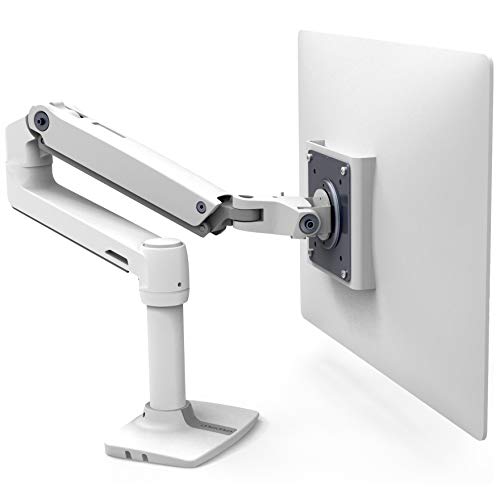
Ergotron, LX Monitor Arm, Single Monitor Desk Mount, fits Flat Curved Ultrawide Computer Monitors up to 34 Inches, 7 to 25 lbs, VESA 75x75mm or 100x100mm, Tall Pole, Polished Aluminum
The Ergotron LX Tall Pole is rated 7 to 25 lb for flat, curved or ultrawide panels up to 34 in, with the extended pole giving more vertical reach for a raised or standing desk.
The trade off: The 7 lb floor means a light 24 in panel under about 7 lb can float upward instead of holding position, so it fits heavier panels better than small light ones.
Who should not buy it: Anyone with a single light 24 in monitor under 7 lb, or anyone who just wants the cheapest way to get a screen off a factory stand.

How we chose
We did not test any of these arms in person. Every pick here comes from the manufacturer specifications published in the Amazon listing, cross-checked against the VESA mount pattern and the gas-spring or friction weight range stated for the product, plus a read of verified owner reviews for recurring complaints about sag, wobble or clamp fit.
The three tiers are built to span the real price range of monitor arms sold for home desks, from a basic friction mount to a premium arm meant to outlast a couple of monitor upgrades, not to just list the three cheapest options.
What does a monitor arm actually replace?
A monitor arm replaces the plastic or metal foot that ships attached to most monitors. That factory stand typically occupies about 9 in of desk depth, and none of that depth comes back once the monitor is on the desk. A clamp-mounted arm needs roughly 3 in of clamp depth and cantilevers the panel forward over that space, which recovers about 6 in of usable desk depth compared to the factory stand.
The other thing an arm buys is height and angle adjustment beyond what most factory stands allow, which matters because the top of the usable screen should sit at or just below eye height for a seated desk.
Gas spring or friction arm, which one do I need?
Friction arms hold position through tension in the joint and are common on the least expensive arms. Gas spring arms use a sealed cylinder rated for a specific weight range and hold heavier panels with less effort to reposition.
The weight range on a gas spring arm is a range, not a single number, and that matters more than most buyers realize before they own one.
| Panel weight vs. range | What happens |
|---|---|
| Below the floor of the range | The spring overpowers the panel and it drifts upward on its own. |
| At the top of the range | The arm holds today, but the spring loses tension over years of use and starts to sag. |
| In the middle of the range | The arm has headroom in both directions and stays adjustable as the spring ages. |
How much does my monitor actually weigh?
Nobody has a scale next to their desk, so weight has to be estimated from panel size. With the factory stand removed, a 24 in panel is roughly 8 lb, a 27 in panel is roughly 11 lb, a 32 in panel is roughly 15 lb, a 34 in ultrawide is roughly 18 lb, and a 38 in ultrawide is roughly 23 lb.
The rule for choosing an arm is to pick one whose rated range comfortably clears your panel weight with room in both directions, not one whose maximum barely covers it.
| Panel size | Approx. weight |
|---|---|
| 24 in | ~8 lb |
| 27 in | ~11 lb |
| 32 in | ~15 lb |
| 34 in ultrawide | ~18 lb |
What VESA pattern does my monitor use?
VESA is the mounting-hole spacing on the back of the panel. Most desktop monitors use a 100x100 mm pattern, smaller panels sometimes use 75x75 mm, and larger or heavier panels sometimes step up to 200x100 mm. Every arm in this guide lists its supported VESA pattern in the listing, and it is worth checking against your specific monitor model before buying, since a mismatch means the included plate will not bolt on.
Clamp or grommet, which desk mount fits?
A clamp base grips the front or back edge of the desk and needs no drilling. A grommet base runs a bolt through a hole in the desktop, which is sturdier on a thin or hollow-core desk but requires either an existing cable grommet hole or drilling one. Clamp openings on the arms in this guide commonly accept 0.4 to 3.5 in of desk edge, which covers most standing desks and traditional desks, but a very thick desktop or an edge with a raised lip can be too much for some clamps.
Shop single monitor arms
Shown across the range this category actually spans, from $25.49 to $309.99, rather than the cheapest few.
- WALI
WALI Adjustable Single Monitor Arm for 13-34 inch Screens, up to 26.4 lbs
$25.49 Check pricePrices change often - Acer
Acer Single Monitor Mount, Fully Adjustable Monitor Arm Fits 17-34" Screens
$31.99 Check pricePrices change often


Buying tips
- Match the rated weight range to your panel size using the approximate weights above, and lean toward the middle of the range rather than its maximum.
- Confirm the VESA pattern on your monitor model before buying rather than assuming 100x100 mm.
- Measure your desk edge thickness if you plan to use a clamp base, especially on a standing desk with a thick worksurface.
- A taller pole helps if the desk is raised for standing use, since it keeps the screen top near eye height at full desk height.
Get the desk setup checklist
One page: the measurements to take, the order to set them in, and the numbers to check against. Free, no spam.
The mailing list opens shortly. Every measurement it covers is already on this site, in the calculators and the fit tables, at no cost and with no address required.
Questions people ask
Do I need a heavy duty arm for a 27 in monitor?
Not usually. A 27 in panel weighs roughly 11 lb with the factory stand removed, which sits comfortably inside the range of a standard gas spring arm rated up to about 20 lb. A heavy duty arm becomes worth the extra cost once you move to a 32 in 4K panel or an ultrawide screen.
Will a monitor arm fit my standing desk?
Most clamp bases accept somewhere between 0.4 and 3.5 in of desk edge thickness, which covers the great majority of standing desks sold for home offices. Measure your desktop edge before buying, and if it has a thick lip or an unusual profile, check the specific clamp opening range listed for that arm.
Why does my new monitor arm sag after a year?
A gas spring arm holds position by matching spring tension to panel weight, and that tension eases slightly over years of use. If the panel sat near the top of the arm rated range from day one, that gradual loss of tension shows up as visible sag. Buying an arm with headroom above your panel weight delays this.
Can I put two monitors on a single monitor arm?
A single arm is built and rated for one VESA mount and one panel weight. Two monitors need a dual arm designed for that combined weight and the wider footprint of two screens, not two single arms sharing a mount point.
Clamp mount or grommet mount, which holds a monitor more securely?
A grommet mount bolted through the desktop is generally the sturdier connection because it does not depend on clamp friction against the desk edge. A clamp mount is easier to install and remove and works well on most desks, but a very heavy panel on a thin desktop benefits from the grommet option where it is available.
What does VESA 100x100 mean on a monitor arm listing?
It refers to the spacing, in millimeters, between the four mounting screw holes on the back of the monitor and on the arm plate. Most desktop monitors use 100x100 mm, some smaller or older panels use 75x75 mm, and some larger or heavier panels step up to 200x100 mm. The two need to match for the plate to bolt on.