Small Space Home Office
Quick answer
A clamp-on monitor arm needs roughly 3 inches of desk depth compared to about 9 inches for a factory monitor stand, freeing up roughly 6 inches of usable surface on a small desk. A desk as shallow as 24 inches deep can still meet the same elbow, wrist and neck posture ranges as a larger desk, provided the chair is fitted first and the monitor distance is checked against pixel density rather than assumed from habit.
The desk depth figures for monitor mounts are published specifications; the small-space layout priorities are practical application of the standards and ratios covered elsewhere on this site, not a separate published standard.
A small home office does not need to compromise on the posture ranges from published ergonomics guidance, but it does need to be more deliberate about which few square feet of desk surface actually matter. This guide applies the fitting order from the setup guide, the desk depth math from the monitor guide, and the cable routing from the cable management guide specifically to the constraint of limited floor space, where every accessory has to earn its footprint.
What actually eats desk depth in a small office, and what gives it back?
A factory monitor stand is the single biggest avoidable use of desk depth in most small setups, occupying about 9 inches of the desk just for its base. Switching to a clamp-on monitor arm needs only about 3 inches of clearance at the desk edge, giving back roughly 6 inches of usable surface, which on a 24 to 30 inch deep desk is a meaningful percentage of the total depth available.
A monitor light bar, covered in the lighting guide, mounts on top of the display rather than adding a lamp base to the desk, which is a second easy win for a small desk competing for surface space between keyboard, mouse and monitor mount.
| Item | Typical footprint | Small-desk impact |
|---|---|---|
| Factory monitor stand | about 9 in deep | Largest single use of depth |
| Clamp-on monitor arm | about 3 in deep | Frees roughly 6 in vs a stand |
| Desk lamp with base | variable, several inches | Competes with keyboard/mouse room |
| Monitor light bar | Mounts on monitor, no desk footprint | Frees the space a lamp base would use |
Small and compact desks
Shown across the range this category actually spans, from $66.49 to $179.99, rather than the cheapest few.

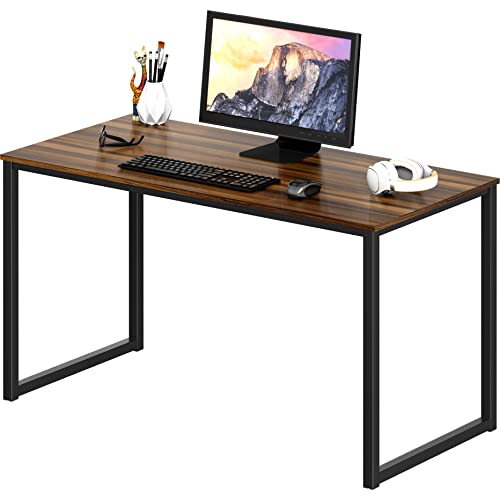


Does a shallow desk force a compromise on posture?
Not if the chair-desk-screen order from the setup guide is followed. Desk depth affects how much surface is available for keyboard, mouse, monitor mount and documents, but it does not change the target elbow, wrist and neck angles from published posture guidance, which are set by chair and monitor height, not by how deep the desk surface is. A well-fitted chair and correctly mounted monitor on a 24 inch deep desk can hit the same posture ranges as the same setup on a 30 inch deep desk.
Where a shallow desk does create a real constraint is monitor distance: a very shallow desk paired with a large, low-resolution monitor may not allow enough distance to comfortably view the whole screen. Checking the resolving distance from the monitor setup guide against your actual available depth before buying a monitor avoids this specific mismatch.
Monitor arms that reclaim desk depth
Shown across the range this category actually spans, from $25.49 to $309.99, rather than the cheapest few.
- WALI
WALI Adjustable Single Monitor Arm for 13-34 inch Screens, up to 26.4 lbs
$25.49 Check pricePrices change often


What desk size actually fits a small room without cramping the setup?
A small desk in the 40 to 48 inch width range with 24 inch depth can comfortably fit a single monitor on an arm, a keyboard, mouse and reasonable working surface, provided the monitor mount is not a factory stand eating into that already-limited depth. Corner and L-shaped layouts can add surface area within the same room footprint by using wall space a straight desk would leave empty, though they need a wider room dimension in one direction to work at all, which is worth measuring against the actual room before assuming an L-shape is the space-efficient choice.
| Desk type | Typical footprint | Best fit |
|---|---|---|
| Compact straight desk | about 40 to 48 in wide, 24 in deep | Tight rooms, single monitor on an arm |
| Standing desk converter | Adds height/depth on top of existing desk | No room for a second piece of furniture |
| L-shaped desk | Two legs, needs wall length in two directions | Corner rooms with room to spare in one dimension |
Space-saving cable and lighting
Shown across the range this category actually spans, from $13.99 to $39.99, rather than the cheapest few.
- LOVJOYSE
Cable Management, 25.3'' Under Desk Cable Management Tray No Drill
$23.99 Check pricePrices change often - Univivi
Univivi No Drill Under Desk Cable Management Tray, 36 inch Cable Management
$39.99 Check pricePrices change often


How does cable management change in a tight footprint?
The tray, sleeve and grommet approach from the cable management guide applies the same way in a small office, but with less room for error: a loose power strip or dangling cable is more likely to be in the way underfoot or visually cluttering a room where the desk is close to other furniture. Mounting the tray and power strip to the underside of the desk itself, rather than to the wall or floor separately, keeps the footprint of the cable system matched to the footprint of the desk rather than adding its own separate floor space requirement.
Is a standing desk converter a better fit than a full standing desk in a small room?
A standing desk converter sits on top of an existing fixed desk, which avoids needing floor space for a second piece of furniture but does add its own depth and height on top of the existing desk surface, worth measuring against the room before assuming it saves space. A full standing desk frame replacing a fixed desk entirely can end up using similar or even less total floor footprint than a fixed desk plus a converter stacked on top, so the space savings are not automatic in either direction and depend on the specific room and existing furniture.
The standing desk vs converter comparison covers the tradeoffs beyond just floor space, including cost and stability, which matter alongside the space question for a small-room decision.
What is the minimum accessory set worth prioritizing when space or budget is tight?
In order of impact per square inch reclaimed: a monitor arm over a factory stand, a properly fitted chair over any desk upgrade, a light bar over a base-mounted lamp, and an under-desk cable tray over a loose power strip. This ordering follows directly from the depth and fitting math above rather than being an arbitrary priority list, and it gets most of the posture and space benefit of a full setup without requiring a larger desk or room.
Get the desk setup checklist
One page: the measurements to take, the order to set them in, and the numbers to check against. Free, no spam.
The mailing list opens shortly. Every measurement it covers is already on this site, in the calculators and the fit tables, at no cost and with no address required.
Questions people ask
Is a 24 inch deep desk too shallow for a home office?
Not inherently. A 24 inch deep desk can support a properly fitted chair and monitor setup that hits the same posture ranges as a deeper desk, as long as the monitor is mounted on an arm rather than a factory stand, which reclaims roughly 6 inches of the available depth compared to a stand.
Does switching to a monitor arm actually make a visible difference on a small desk?
Yes, in most cases. A factory stand's roughly 9 inch footprint versus a clamp arm's roughly 3 inch footprint is a difference of about 6 inches, which on a desk that is only 24 to 30 inches deep to begin with is a substantial fraction of the total usable surface, often the difference between a cramped keyboard position and a comfortable one.
Should I prioritize a bigger desk or a better chair if I can only afford one right now?
The chair, generally. Posture targets from published guidance are set primarily by chair fit and monitor placement, not by desk size, so a well-fitted chair on a small desk gets you most of the ergonomic benefit. A bigger desk without a properly fitted chair does not correct elbow, wrist or neck positioning on its own.
Can an L-shaped desk work in a small room?
Only if the room has enough length in one direction to accommodate the return, since an L-shape trades floor footprint in one direction for surface area, rather than reducing total footprint. Measure the actual room dimensions against the desk's two leg lengths before assuming an L-shape saves space; in a genuinely tight room, a single straight desk with a monitor arm often fits more comfortably.
Does a standing desk converter save floor space compared to a full standing desk?
Not automatically. A converter avoids adding a second piece of furniture since it sits on an existing desk, but it adds its own height and sometimes depth on top of that desk's footprint. A full standing desk frame replacing a fixed desk can end up with a similar or smaller total footprint, so it is worth comparing both against the specific room rather than assuming the converter is always the space-saving choice.
What is the single cheapest change that helps a small office the most?
For most small setups, swapping a factory monitor stand for a clamp-on monitor arm delivers the best combination of low cost and reclaimed usable desk depth, roughly 6 inches, which is often enough to turn a cramped keyboard and mouse area into a comfortable one without buying a new desk at all.