Best Ultrawide Monitors
Quick answer
The LG 34WR55QK-B UltraWide QHD monitor (B0DQF8LRGZ, $329.99) is the best ultrawide for a home office because its USB-C connection and height-adjustable stand suit desk work better than the gaming-first alternatives at this size. For a lower price with similar screen area, the Sceptre 34-Inch Curved Ultrawide (B0FDVNJ8ST, $266.47) covers the same 3440x1440 resolution.
Picks are ranked from published resolution, refresh rate, connectivity and stand specifications, plus verified owner reviews on Amazon. No unit was tested in person.
An ultrawide monitor replaces a dual monitor setup with one continuous 21:9 panel, and the pick that earns Top Pick here is the LG 34WR55QK-B (B0DQF8LRGZ) at $329.99, a 3440x1440 curved panel with USB-C connectivity and a height-adjustable stand built for desk work rather than gaming-first features.

LG 34WR55QK-B 34-inch UltraWide WQHD (3440 x 1440) Curved Computer Monitor, 100Hz, 5ms, HDR10, Reader Mode, HDMI, DisplayPort, USB Type-C, Tilt/Height Adjustable Stand, Black
USB-C connectivity can power a laptop and carry video over one cable, and the height-adjustable stand matters more for a desk-work monitor than the higher refresh rates the gaming-oriented ultrawides in this size compete on.
The three tiers
New! Sceptre Curved 34-inch Prime Gaming Monitor 3440 x 1440 up to 240Hz 1500R 1ms 100% sRGB DisplayPort x2 HDMI x2 Build-in Speakers, Machine Black 2027 (C345B-QU240T Series)
This 34 in curved panel runs 3440x1440 at up to 240Hz with dual DisplayPort and HDMI inputs, giving full ultrawide screen real estate at the lowest price in this size class.
The trade off: It is built and priced around gaming refresh rate rather than desk-work features like USB-C or a fully adjustable stand.

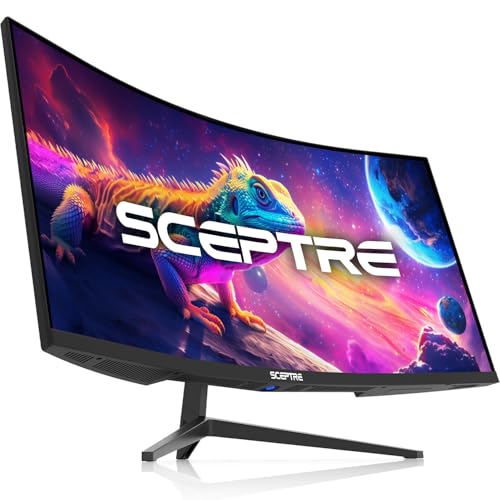
Sceptre 34-Inch Curved Ultrawide WQHD Monitor, 3440 x 1440, R1500, Up to 180Hz/165Hz, DisplayPort x2, 100% sRGB, 1ms, Built-in Speakers, Black (C345B-QUT168 Series)
A 34 in curved WQHD panel at 3440x1440 with up to 180Hz refresh and dual DisplayPort, sitting in the middle of the ultrawide price range with a wider color coverage spec than the entry option.
The trade off: Like the starter option, its stand and connectivity are built around a general monitor rather than the desk-specific USB-C and height adjustment found on the pricier LG panel.
LG 34WR55QK-B 34-inch UltraWide WQHD (3440 x 1440) Curved Computer Monitor, 100Hz, 5ms, HDR10, Reader Mode, HDMI, DisplayPort, USB Type-C, Tilt/Height Adjustable Stand, Black
USB-C connectivity, HDR10 support and a height-adjustable stand make this the ultrawide built specifically for desk work, where a single cable can carry both video and laptop charging.
The trade off: Its refresh rate tops out lower than the gaming-oriented ultrawides above, so a buyer who splits time between office work and fast-paced gaming gets less there for the higher price.
Who should not buy it: Anyone buying an ultrawide primarily for high refresh rate gaming, where the cheaper panels above offer more frames per second for less money.
How we chose
We did not test any of these monitors in person. Rankings come from the resolution, refresh rate, connectivity and stand adjustability published in each Amazon listing, cross-checked against verified owner reviews for recurring complaints about stand stability, backlight bleed or USB-C power delivery on the panels that offer it.
The three tiers span the real price range of 34 in ultrawide monitors sold for home desks, from an entry gaming-oriented panel to a desk-focused USB-C display, rather than defaulting to the cheapest three panels.
How much wider is an ultrawide monitor than a standard screen?
A standard 16:9 monitor width works out to roughly its diagonal size multiplied by 0.872. A 21:9 ultrawide panel is proportionally wider, working out to roughly its diagonal size multiplied by 0.922. A 34 in ultrawide is about 31.3 in wide, noticeably more desk width than a 27 in 16:9 monitor at about 23.5 in wide.
| Diagonal | Aspect ratio | Approx. width |
|---|---|---|
| 27 in | 16:9 | ~23.5 in |
| 32 in | 16:9 | ~27.9 in |
| 34 in | 21:9 | ~31.3 in |
Ultrawide monitor or dual monitors, which fits a home office better?
An ultrawide gives one continuous surface with no bezel gap in the middle, which suits a single maximized window split into virtual panes or a wide spreadsheet. Dual monitors give a true hardware break between screens, which suits keeping one application fully separate from another, such as a video call on one screen and notes on the other. Desk depth also plays a role, since a curved ultrawide needs less desk depth for the same field of view than two flat monitors angled inward.
How much does a 34 in ultrawide weigh, and does that affect the arm I need?
A 34 in ultrawide panel weighs roughly 18 lb with the factory stand removed, noticeably more than a 27 in panel at roughly 11 lb. A standard single monitor arm rated for a 27 in screen often does not have headroom for this weight, so an ultrawide typically calls for a heavier duty arm if you plan to mount it rather than use the factory stand.
| Panel | Approx. weight |
|---|---|
| 27 in, 16:9 | ~11 lb |
| 34 in, 21:9 ultrawide | ~18 lb |
| 38 in, 21:9 ultrawide | ~23 lb |
What does USB-C connectivity add on an ultrawide?
A USB-C monitor with power delivery can carry a video signal from a laptop and send power back to charge it over the same cable, which removes a separate charger and a separate video cable from the desk. Not every ultrawide monitor includes this, and it is more common on panels positioned for office and creative use than on gaming-first ultrawide panels.
Does a curved screen matter more on an ultrawide?
Yes, more than on a standard 16:9 monitor. On a wide 21:9 panel, a flat screen puts the edges noticeably farther from the eye than the center, while a curve keeps viewing distance more consistent across the width of the screen. All three panels in this guide are curved for that reason.
Shop ultrawide monitors
Shown across the range this category actually spans, from $209.97 to $329.99, rather than the cheapest few.
- SANSUI
SANSUI 34 Inch Curved Monitor 240Hz UWQHD 3440×1440 Gaming Monitor
$239.99 Check pricePrices change often

Buying tips
- Measure desk depth before buying, since a curved ultrawide still needs enough distance to see the full width comfortably.
- Decide between refresh rate and desk-work features like USB-C before choosing a tier, since the picks here trade off differently on each.
- Plan for a heavier duty monitor arm if you intend to mount a 34 in or larger ultrawide rather than use the factory stand.
- Check the stand adjustment range if you are not planning to add a separate monitor arm.
Get the desk setup checklist
One page: the measurements to take, the order to set them in, and the numbers to check against. Free, no spam.
The mailing list opens shortly. Every measurement it covers is already on this site, in the calculators and the fit tables, at no cost and with no address required.
Questions people ask
Is a 34 in ultrawide monitor better than two 24 in monitors?
An ultrawide gives one continuous surface without a bezel gap, which suits a maximized window split into panes. Two separate monitors give a hardware break that suits keeping applications fully separate, such as a call on one screen and notes on another. Neither is strictly better, and the right choice depends on how you split your work.
Do I need a special monitor arm for an ultrawide screen?
A 34 in ultrawide weighs roughly 18 lb with the factory stand removed, more than most standard single arms are rated for. A heavier duty arm, typically rated 30 lb or more, gives real headroom for an ultrawide panel rather than running a standard arm near its limit.
What resolution do most 34 in ultrawide monitors use?
The common resolution at 34 in is 3440x1440, sometimes called UWQHD or WQHD ultrawide. This gives more horizontal pixels than a standard 1440p monitor while keeping the same vertical pixel count, which is what produces the wider working area rather than a taller one.
Is a curved ultrawide monitor worth it over a flat one?
On a wide 21:9 panel, a curve keeps the edges of the screen closer to the same viewing distance as the center, which a flat panel does not do as well at this width. Nearly all ultrawide monitors sold at 34 in and larger are curved for this reason.
Can an ultrawide monitor replace two separate monitors for work?
For many workflows, yes, since window-snapping tools can divide an ultrawide into two or three virtual panes on one continuous surface. Tasks that specifically need a hardware break between displays, such as running full-screen video on one screen while working on another, still favor two separate monitors.
Does USB-C matter if I use a desktop computer instead of a laptop?
USB-C power delivery mainly benefits laptop users, since it can charge the laptop while carrying video over one cable. On a desktop, USB-C on a monitor still works as a video input if the graphics card supports it, but the power delivery feature specifically has no benefit without a laptop to charge.